Desktop Notifications
NVM for Windows uses native desktop notifications with the Windows Notification Center. Missed notifications stay in the Notification Center until acknowledged. Personal notification preferences are honored.
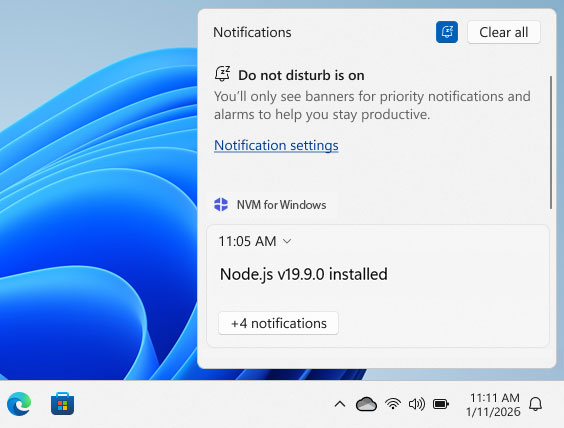
When notifications appear
Most CLI notifications display only when NVM is not already in the foreground (ex: background agent). If you run nvm in an interactive terminal and that window has focus, those notifications are skipped so the UI does not interrupt work you are already watching.
Background cases that still notify include:
- Long-running installs started from another context
- Scheduled sync/update checks (
sync.exe) - License expiry reminders (certified editions)
News and updates can be turned off with disable_announcements. License expiry notifications are not suppressed by that setting.
CLI notifications
These use Notification Center when the NVM process is not in the foreground:
| Trigger | Title | Message (approx.) |
|---|---|---|
| Install finished | (empty) or failure title | Node.js vX installed/Node.js vX Installation Failed (plus error text) |
nvm use (default switch) | (empty) | Now using Node.js vX by default. |
nvm uninstall | (empty) | Joined status lines (uninstalled, skipped, active switch, cache purge, and similar) |
nvm config set | (empty) | key set to value |
nvm alias add | (empty) | "<name>" now refers to vX.X.X |
nvm alias remove | (empty) | <count> alias(es) removed successfully. |
nvm pin | (empty) | Success text for .nvmrc/package.json engines updates |
| Symlink failure (Developer Mode off) | Help Enabling Symlinks |
Sync notifications
Scheduled maintenance can also display notifications:
| Trigger | Title | Notes |
|---|---|---|
| News feed | Feed entry title | Body is the entry description with links; skipped when disable_announcements is true |
| Update available | Update Available | Version availability with View/Upgrade links; skipped when disable_announcements is true |
| License expiry (certified builds) | Expiration warning | Not suppressed by disable_announcements; at most one notification per milestone/day. |