Administrative Templates (Intune & GPO)
NVM for Windows certified governance builds come with ADMX/ADML templates. Use them in on-premises Group Policy or Microsoft Intune configuration profiles.
| Resource | Guidance |
|---|---|
| ADMX file | Controls the technical registry settings. Available at portal.author.io. |
| ADML file | Provides the language text for the settings. Available at portal.author.io. |
| Target path | HKLM\Software\Policies\Author Software\nvm |
Download the ADMX/ADML from the customer portal. For Win32 app installation through Intune, see Install → Intune.
Intune policy configuration
After NVM for Windows is installed, enforce settings with the imported administrative template.
1. Import ADMX and ADML
- In Intune admin center, go to Devices > Windows > Configuration.
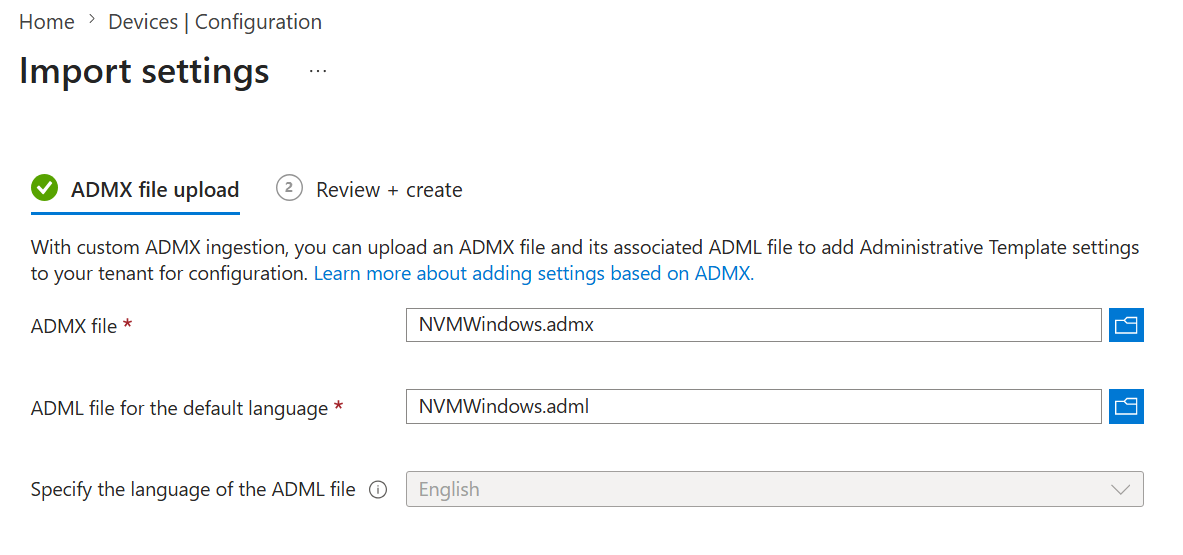
- Open the Import ADMX tab and select Import.
- Upload
NVMWindows.admxanden-US\NVMWindows.admlfrom your deployment pack. NoWindows.admxprerequisite is required.
- On the device, run
certified\enhanced\policy\Get-NvmAdmxIngestDiagnostics.ps1and note the HRESULT onADMX Ingestionevents (for example0x8007000Dinvalid ADMX data,0x80070005blocked registry path). - Delete the prior NVM ADMX import in Intune, then re-import the updated template.
- Clear stale ingest state on the device, then sync again:
Remove-Item -Recurse -Force "$env:ProgramData\Microsoft\PolicyManager\ADMXIngestion\*nvm*" -ErrorAction SilentlyContinue
Get-ChildItem 'HKLM:\SOFTWARE\Microsoft\PolicyManager\AdmxInstalled' -Recurse |
  Where-Object { $_.Name -match 'nvm' } |
  Remove-Item -Recurse -Force
Until ADMX ingest succeeds, deploy values with a Custom configuration profile (Registry CSP OMA-URIs). Value names and types are in the Central Registry Reference.
2. Create a configuration profile
- Go to Devices > Configuration > Create > New policy.
- Platform: Windows 10 and later (covers Windows 11 and Windows Server 2019 and later).
- Profile type: Templates → Imported Administrative templates.
- Navigate to Author Software > NVM for Windows and configure policies.
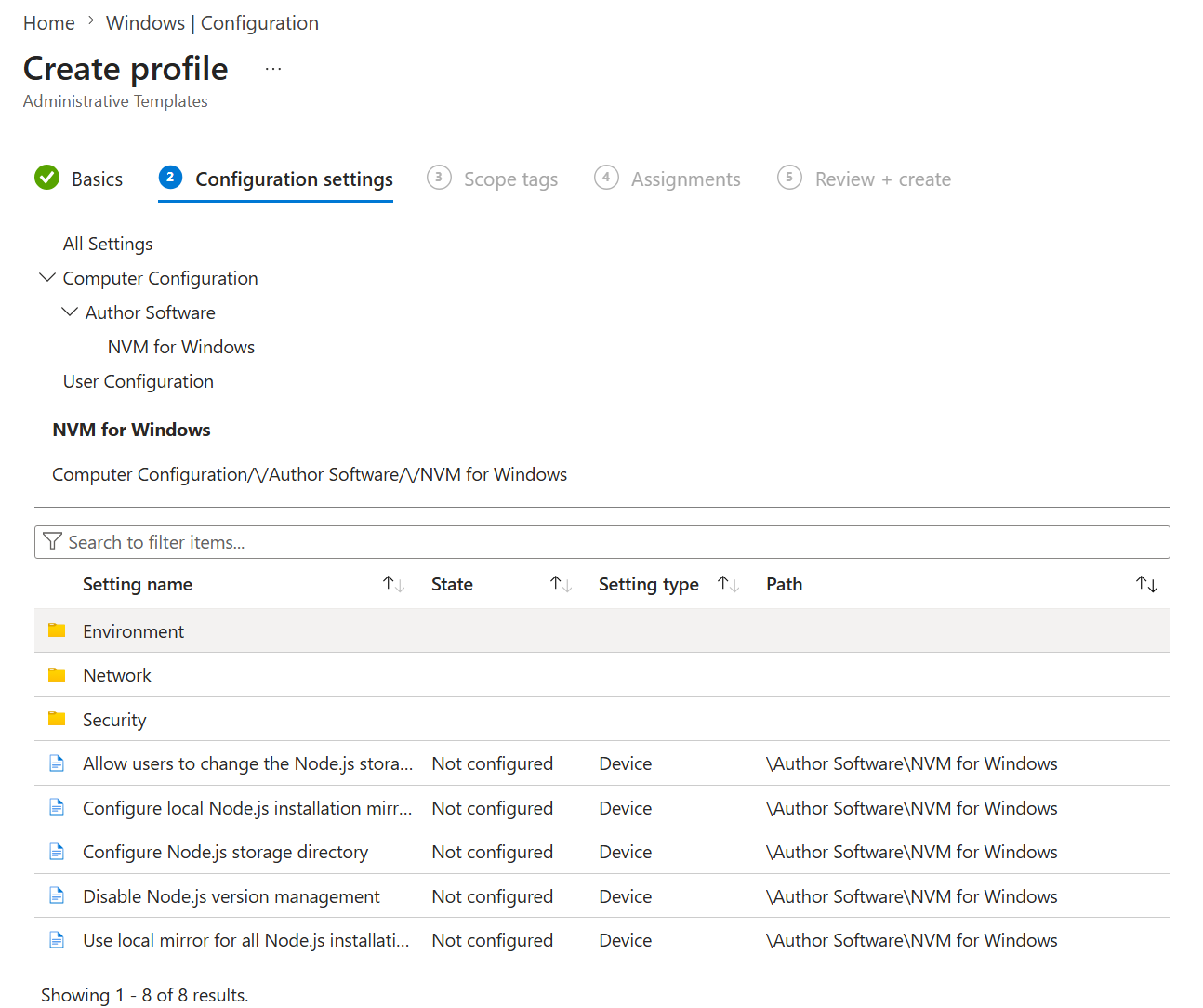
Policy names match the GPO tree below. Registry value names are in the Central Registry Reference.
You can also deploy individual registry values with a Settings catalog or Custom configuration profile using Registry CSP OMA-URIs. Prefer ADMX import when available; use Registry CSP as a fallback or for one-off keys. See the Central Registry Reference.
Group Policy (GPO) Deployment
You will need access to your domain controller to perform the tasks in this section.
On your domain controller:
- Copy
NVMWindows.admxto\\domain\sysvol\domain\Policies\PolicyDefinitions. - Copy
en-US\NVMWindows.admlto\\domain\sysvol\domain\Policies\PolicyDefinitions\en-US. - Open the Group Policy Management Editor (
Windows Key + R, typegpedit.mscand press Enter.) - Locate the Group Policy Object (or create a new one) used to manage Node.js policies. Right click and select Edit.
- Navigate to Computer Configuration > Policies > Administrative Templates > Author Software > NVM for Windows.
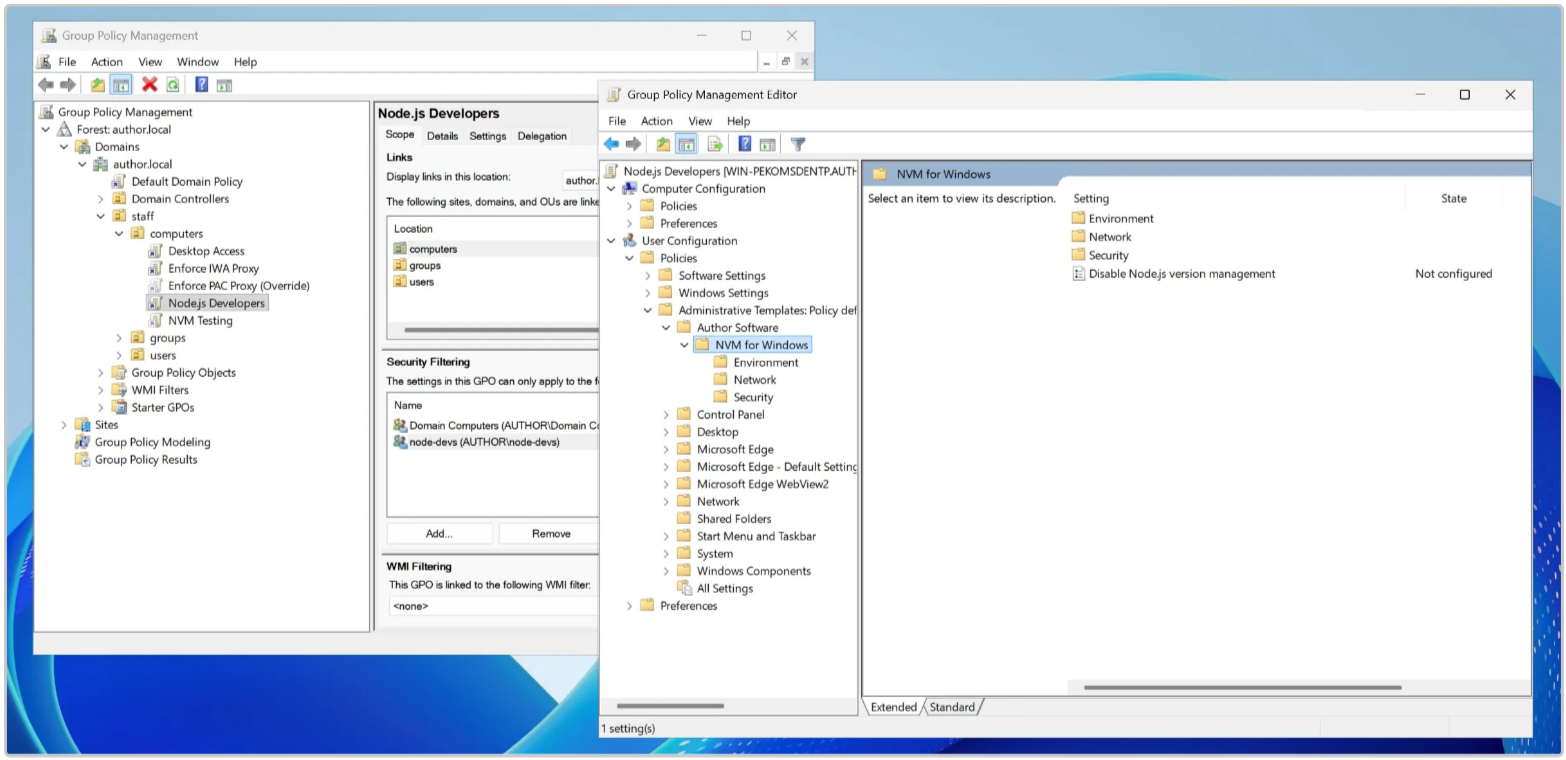
Policy names below match the Administrative Templates tree in Group Policy Management Editor and Intune after ADMX import.
Computer Configuration
└── Policies
    └── Administrative Templates
        └── Author Software
            └── NVM for Windows
                ├── Disable Node.js version management
                ├── Configure Node.js storage directory
                ├── Allow users to change the Node.js storage directory
                ├── Configure local Node.js installation mirror source directory
                ├── Use local mirror for all Node.js installations
                ├── Network
                │   ├── Configure proxy server address
                │   ├── Configure proxy authentication type
                │   ├── Configure proxy authentication value
                │   ├── Configure Node.js download mirror(s)
                │   ├── Configure npm registry mirror(s)
                │   ├── Always cache downloads
                │   ├── Disable removal of cached downloads
                │   ├── Disable NVM for Windows upgrades
                │   └── Disable project and release announcements
                ├── Environment
                │   ├── Set operating mode
                │   ├── Configure custom version aliases
                │   ├── Configure auto-installed global npm modules
                │   └── Shim mode
                │       ├── Configure automatic version detection files (e.g. .nvmrc)
                │       ├── Configure default auto-detect file
                │       ├── Disable automatic version detection
                │       ├── Disable automatic version installation
                │       ├── Always prompt before automatic installation
                │       ├── Disable native tool installation
                │       └── Configure package manager mismatch action
                └── Security
                    ├── Skip live license JWKS (air-gapped JWT verify)
                    ├── Configure allowed Node.js versions
                    ├── Configure blocked Node.js versions
                    ├── Disable insecure downloads
                    ├── Include verbose identity metadata in mirror license tokens
                    ├── Configure approved vendors (trusted code signers)
                    └── Shim mode
                        ├── Enable audit logging
                        ├── Enforce Node.js permission model
                        ├── Prevent modification of global JavaScript prototypes
                        ├── Disallow dynamic code generation from strings
                        └── Configure npm package minimum release age
Contact [email protected] to request a language other than English.